
Using VSCode as local editor connected with a cluster frontend via SSH is a common and convenient setup. You can find the setup instructions on the Microsoft site at the URL: https://code.visualstudio.com/docs/remote/ssh
The suggested setup works well but doesn’t scale and a couple of users can lock the server.
A limiting task is active but the best option for the user is apply the following instruction to disable the javascript/typescript remote jobs that is at the root of the problem:
- Hit the extensions button in VS Code (which looks like building blocks on the left toolbar)
- Search for ‘@builtin TypeScript’.
- Disable the TypeScript and Javascript Language Features extension
- Reload
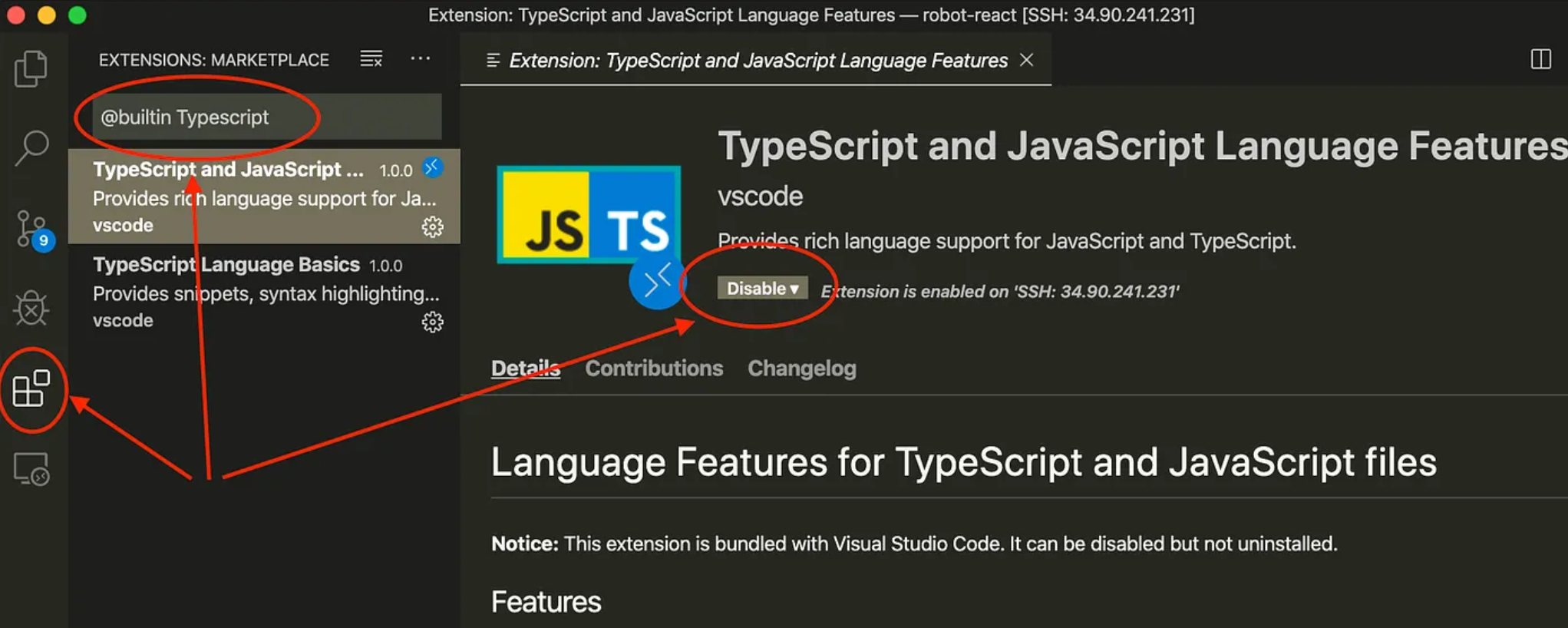
CREDITS: instructions found at: https://medium.com/good-robot/use-visual-studio-code-remote-ssh-sftp-without-crashing-your-server-a1dc2ef0936d
and at: https://www.robleeper.com/thoughts/visual-studio-code-crashed-our-server